How to Write a 1980s Photo Prompt That Looks Like a Real 1985 Snapshot
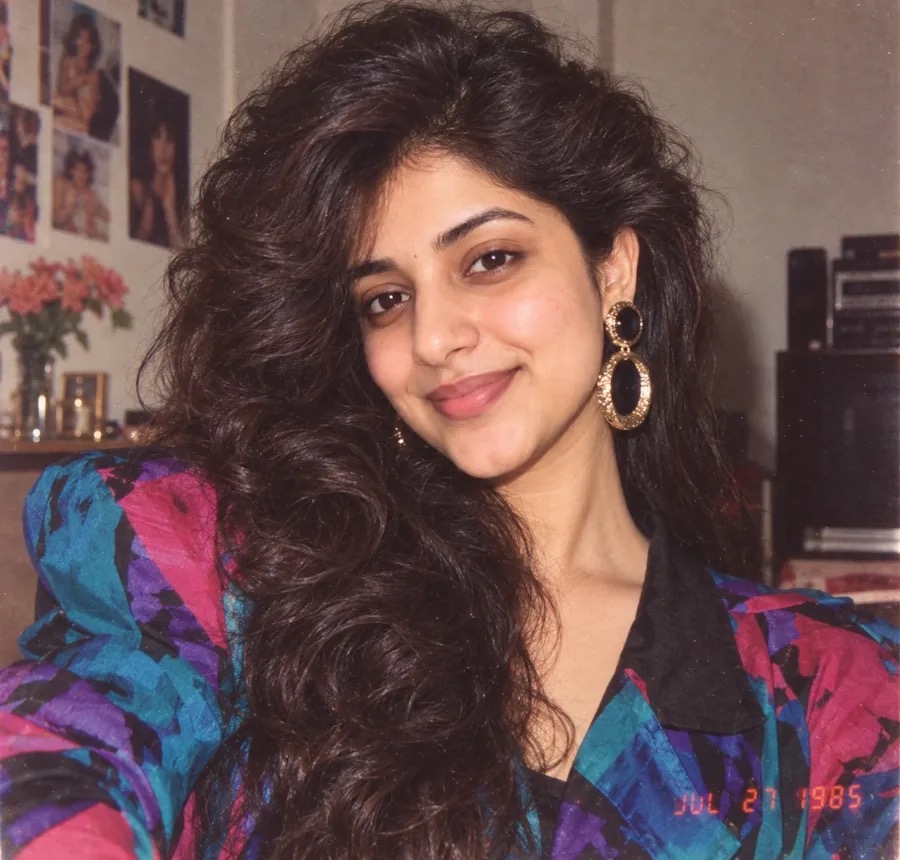
A good 1980s photo prompt doesn’t just say “make it look retro.” It tells the image model which camera took the picture, how the light hit the subject, and what was on the film. Leave those details out and you usually get a modern, over-sharp image with a beige filter on top.
This guide breaks down what makes an AI image read as a genuine 1980s photograph, gives you a prompt you can paste straight into ChatGPT or Gemini to turn your own selfie into a 1985 photo, and points to a free gallery of retro AI prompts you can copy and adapt.
Why most “retro” AI prompts miss the 1980s look
Most prompts fail because they describe a style instead of a capture. “80s style portrait” leaves the model to guess, and it often guesses wrong: clean skin, perfect focus, a phone-camera dynamic range.
Real photos from the decade came from 35mm compacts, disposable cameras, Polaroid instant film and camcorders. Each one left marks that are easy to name in a prompt:
- Direct on-camera flash: hard shadows behind the subject, bright faces, dark backgrounds.
- Film color: warm skin tones, slightly faded shadows, a small shift in the highlights.
- Imperfection: grain, soft edges, crooked framing, the odd blink or motion blur.
Once those words are in the prompt, the outfit and setting only have to support the look, not carry it alone.
The building blocks of a 1980s photo prompt
A reliable vintage photo prompt usually has four layers. Write them in roughly this order so the model sees the camera and film before the subject.
- Capture method. “35mm film snapshot”, “disposable camera photo”, “Polaroid instant print” or “camcorder still frame”.
- Film and light. Name a film stock such as Kodak Gold or Fujicolor for color, then the light: direct flash, mall fluorescent tubes, or pink and cyan neon.
- Period details. Teased or permed hair, shoulder pads, denim jackets, arcade cabinets, wood-panelled walls, boxy cars. These place the scene without you having to write the year.
- Defects. Visible film grain, slight motion blur, soft focus at the edges, a red-orange date stamp in the corner.
Just as important is what to leave out. Words like “8K”, “ultra sharp” or “HDR” push the result back toward a modern camera, so drop them from any retro AI image prompt.
How to turn your own photo into a 1985 photo in ChatGPT or Gemini
The viral version of this trend starts from your own picture rather than plain text. It works in any model that can edit an uploaded image, including ChatGPT and Gemini.
- Pick a clear, front-facing photo with your face well lit.
- Upload it to ChatGPT or Gemini.
- Paste a prompt that locks your identity and changes everything else.
Here is the prompt used on Vintage Photo Prompt for its 1985 before-and-after example:
Using my uploaded photo, show me what I would have looked like around 1985. Preserve my identity, facial features, skin tone, age, and recognizable appearance. Reimagine my hair, clothing, accessories, and surroundings with bold, unmistakably mid-1980s styling—expressive silhouettes, statement accessories, layered details, distinctive colors, and textures. Make it feel like a genuine 1985 photograph with analog grain, faded color, direct flash, and subtle softness. Add a period-accurate 1980s red-orange date stamp in the lower corner. No modern objects or text.
Notice how the prompt splits into two jobs. The first sentences protect the face; the rest describes styling, film and flash. If your result drifts away from your real face, repeat the identity line at the end. If it looks too clean, add “visible film grain” or “slight motion blur”.
Copy and adapt prompts from a free 1980s prompt gallery
Writing every prompt from scratch is slow, and it is hard to judge a prompt without seeing what it produced. Vintage Photo Prompt is a free gallery that pairs AI-generated 1980s images with the exact prompt behind each one, so you can see the output before you copy anything.
The gallery is grouped by style, which makes it quicker to find a starting point:
- Portrait and studio: mall laser backdrops, soft-box glamour shots, yearbook and passport photos.
- Polaroid and film: date-stamped family albums, house-party flash, camcorder freeze frames.
- Neon and city: arcades, Hong Kong street style, pastel beachfront sunsets.
- Cinematic and illustration: film-still moods and 3D or illustrated takes on the decade.
There is also a dedicated page of ChatGPT 1980s photo prompts written for editing your own photo, sorted into groups such as men, women, couples and families, and Bollywood.
The workflow that tends to work best: find the image closest to the mood you want, copy its prompt, then change only the subject, outfit or location. Leave the camera, film and lighting words alone, because they are what make the picture read as a 1980s photo.
Getting better results from vintage photo prompts
Image models are random, so treat each prompt as a starting point rather than a one-shot answer.
- Generate three or four versions and keep the one with the most convincing grain and color.
- Change one thing at a time. If you swap the outfit and the lighting together, you won’t know which change helped.
- Expect model differences. The same text gives slightly different grain and color in ChatGPT, Gemini, Midjourney, Flux or Stable Diffusion.
- Respect image credits. Prompts are free to copy, but example images belong to the people who made them; link to the original post if you republish one.
FAQ
Which AI tools work with a 1980s photo prompt?
Any text-to-image model can use the prompt text, including ChatGPT, Gemini, Midjourney, Flux and Stable Diffusion. To transform your own picture, you need a model that supports image editing, such as ChatGPT or Gemini.
How do I keep my face the same when making a 1985 photo?
Put an explicit identity instruction at the start of the prompt, for example “preserve my identity, facial features, skin tone and age”, and use a clear, well-lit source photo. If the face still drifts, repeat that instruction at the end of the prompt.
Why does my retro AI image still look modern?
Usually the prompt is missing a capture method and film details, or it contains words like “8K” or “ultra sharp”. Name the camera and film, ask for direct flash and grain, and remove high-resolution terms.
Conclusion
A convincing 1980s photo prompt describes how the picture was taken, not just what was in it: camera, film, flash, period details and a few honest flaws. Start from the 1985 prompt above for your own selfie, or browse vintagephotoprompt.com to copy a tested prompt and change only the parts that matter to you.